
Many organisations have started deploying Entra ID passkeys, spurred by Microsoft’s announcement to enable Passkeys by default on MC1426371.
This checklist covers five areas: enforcement, account recovery, new employee setup, monitoring, and service accounts. A2g Cyber considers a migration complete when passkeys are required for everyday sign-ins, support processes are ready, and any remaining exceptions are accepted by the organisation.
If your organisation needs support on their passkey journey then check out our tool - Passkey Helper. The tool consists of a user-facing wizard to help guide through registration and self-enforcement of passkeys, and gives administrators a central place to track progress. A free tier exists to evaluate the tool. We also have helped advise and support several organisations deploy Entra ID passkeys at scale - reach out.
We’ve had hands-on experience with everything in this blog. If something isn’t clear, drop us an email and we will clarify.
So, what are our 5 checks to decide whether you’re passkey complete or not? Read on…
1) Passkeys are required for everyday sign-ins
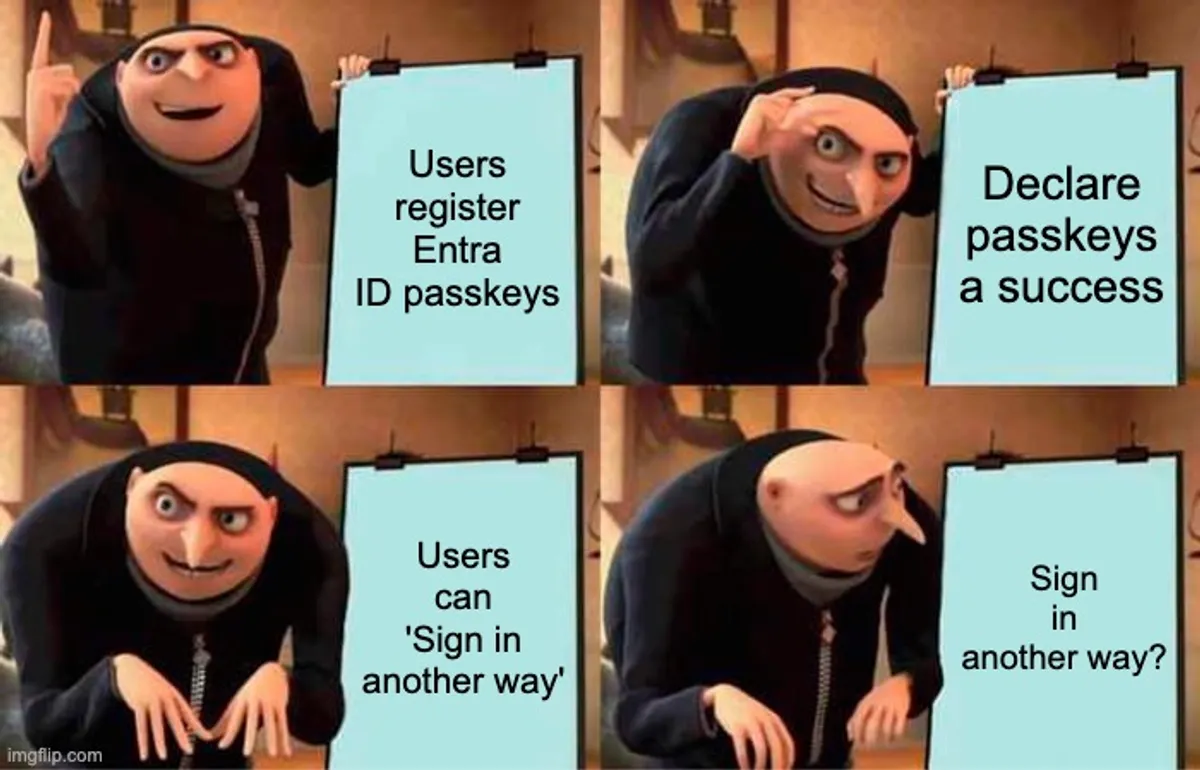
A user could have registered a passkey but they can still select “Sign in another way” and choose a weaker sign-in method. That ‘other ways’ feature gives an Adversary in The Middle (AiTM) a way to downgrade the sign-in.
Conditional Access policies are needed to require a phish-resistant authentication method, such as passkeys. Some organisations need exceptions for particular users, applications, or locations. To assess completion, make those exceptions visible and check how they are protected.
Completion criteria
- Conditional Access requires phishing-resistant authentication across ‘All user’, with documented exceptions.
- Passkeys are required for everyday sign-ins, apart from those agreed exceptions (e.g. device, location, users, apps).
- Each exception has documented protections (time bound, alerts etc), and the organisation has accepted the remaining risk.
Questions to answer
- Which users, devices, applications, or locations are still outside the passkey requirement?
- Which exceptions are temporary, and which are expected to remain?
- Who reviews the exceptions, and how often?
- Are exceptions automatically time-bound?
You can use our recommended Conditional Access policies as a starting point when planning enforcement.
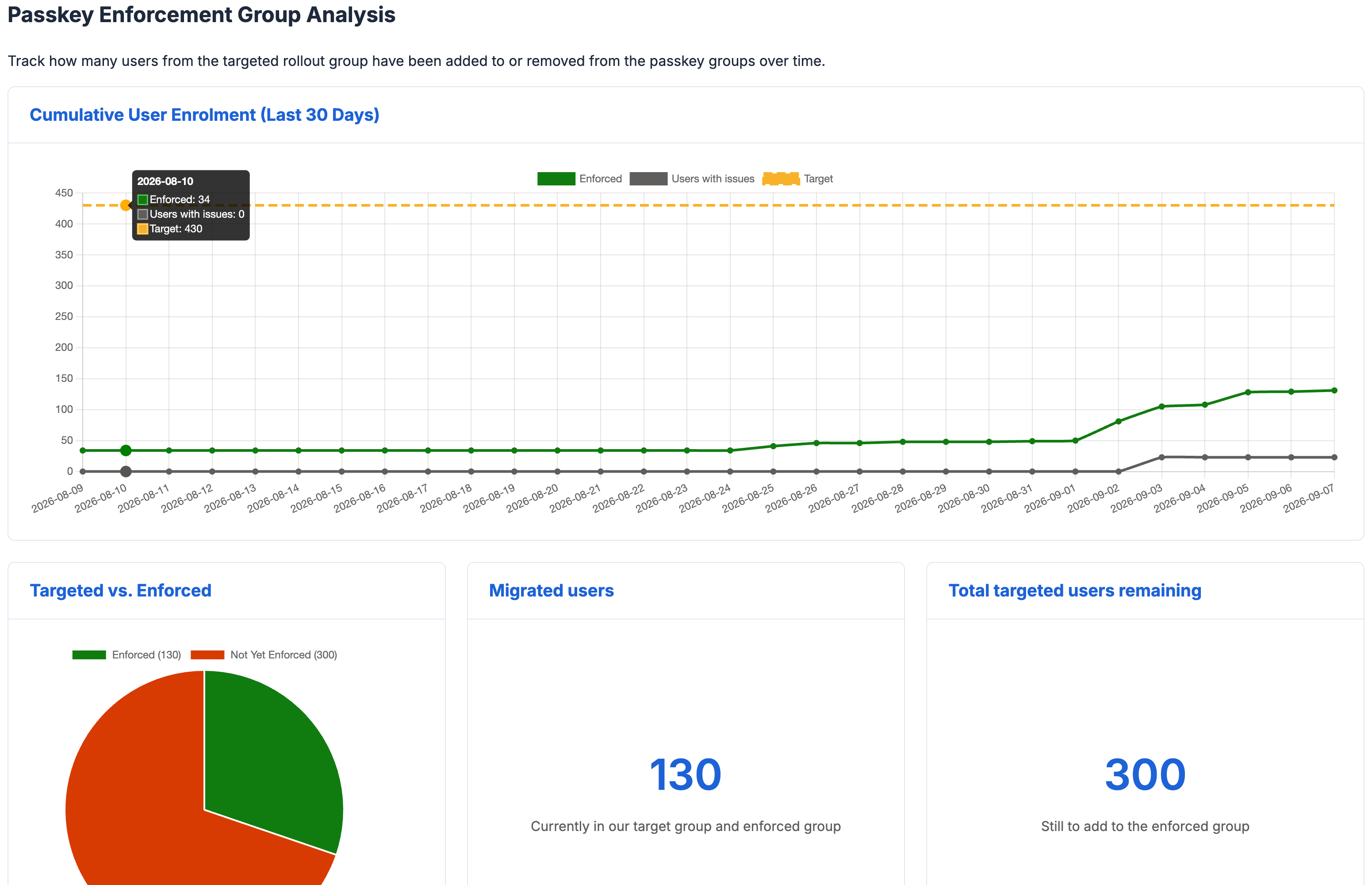
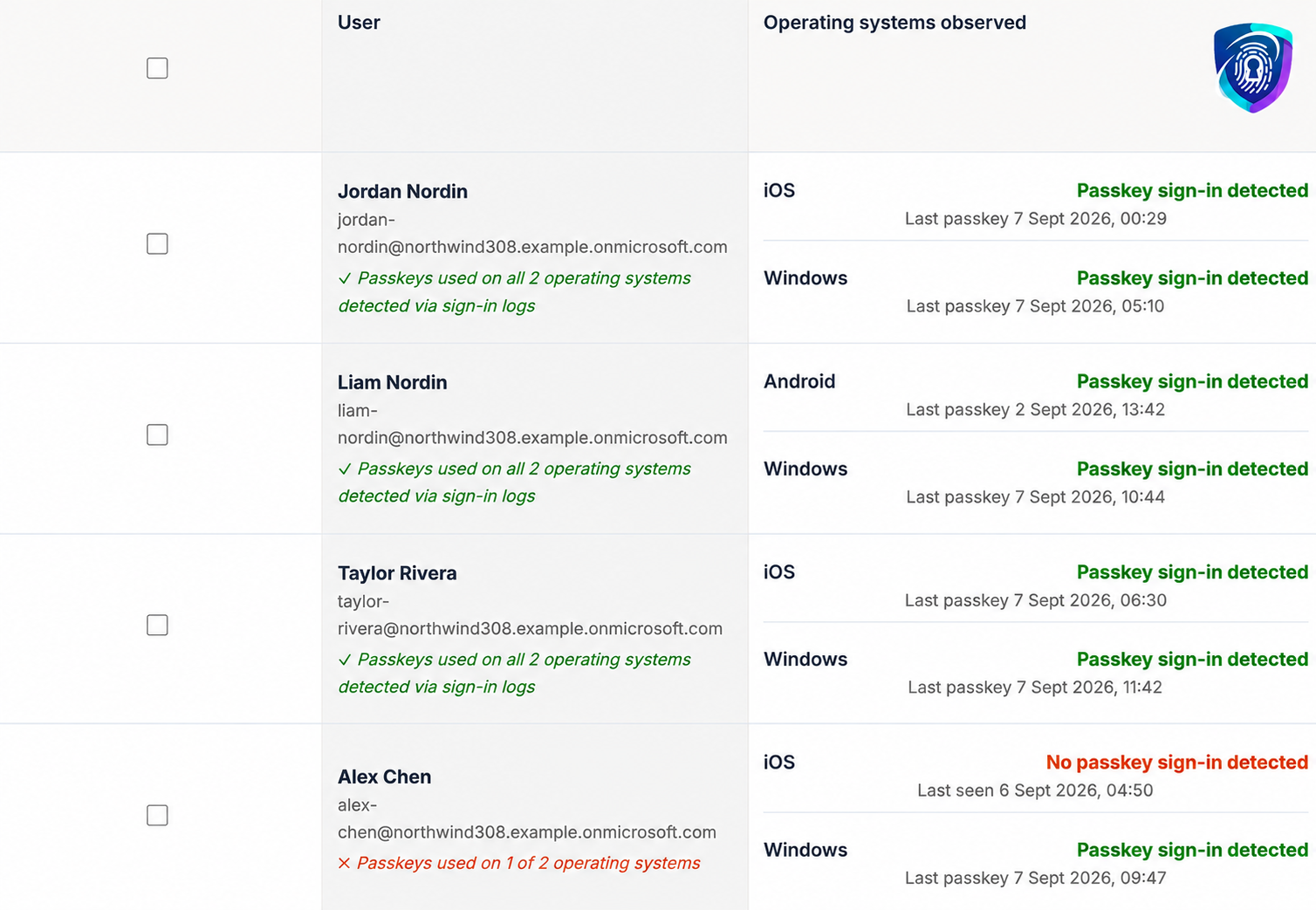
The administrator view of Passkey Helper (below) helps you see how far the rollout has progressed and how many users still need to move into enforcement.
2) The help desk can restore access securely
A user loses their phone and needs to sign in. Previously, MFA removal was reset and help offered to set up a new device. Passkeys on Entra ID work as a single credential to gain access to an account - meaning a password is no longer needed (although a passkey should require something to unlock it). Loss of a passkey can result in account access IF the passkey was not properly protected. Help desk processes, such as identity verification, need to be modified to take this into account.
Can your help desk restore access while checking that the request really comes from that user?
Recovery needs to work under pressure. Staff should have clear steps to follow and know when a request needs extra checks.
Completion criteria
- The help desk can restore access when a user loses access to their passkey.
- Recovery includes identity checks designed to resist attempts to impersonate the user.
- Temporary access, such as a Temporary Access Pass (TAP), is limited in duration, recorded, and reviewed. Any temporary exclusion from passkey enforcement is treated as a last resort and has the same oversight.
- Support staff know when to escalate unusual or high-risk recovery requests.
Questions to answer
- What happens if a user loses their phone, laptop, or security key?
- Can users perform a reset from another company issued device?
- Do sensitive accounts, such as those belonging to senior executives, need additional recovery controls?
- Can the help desk recognise signs that someone is trying to take over an account?
- Who can grant temporary access, and who reviews its use?
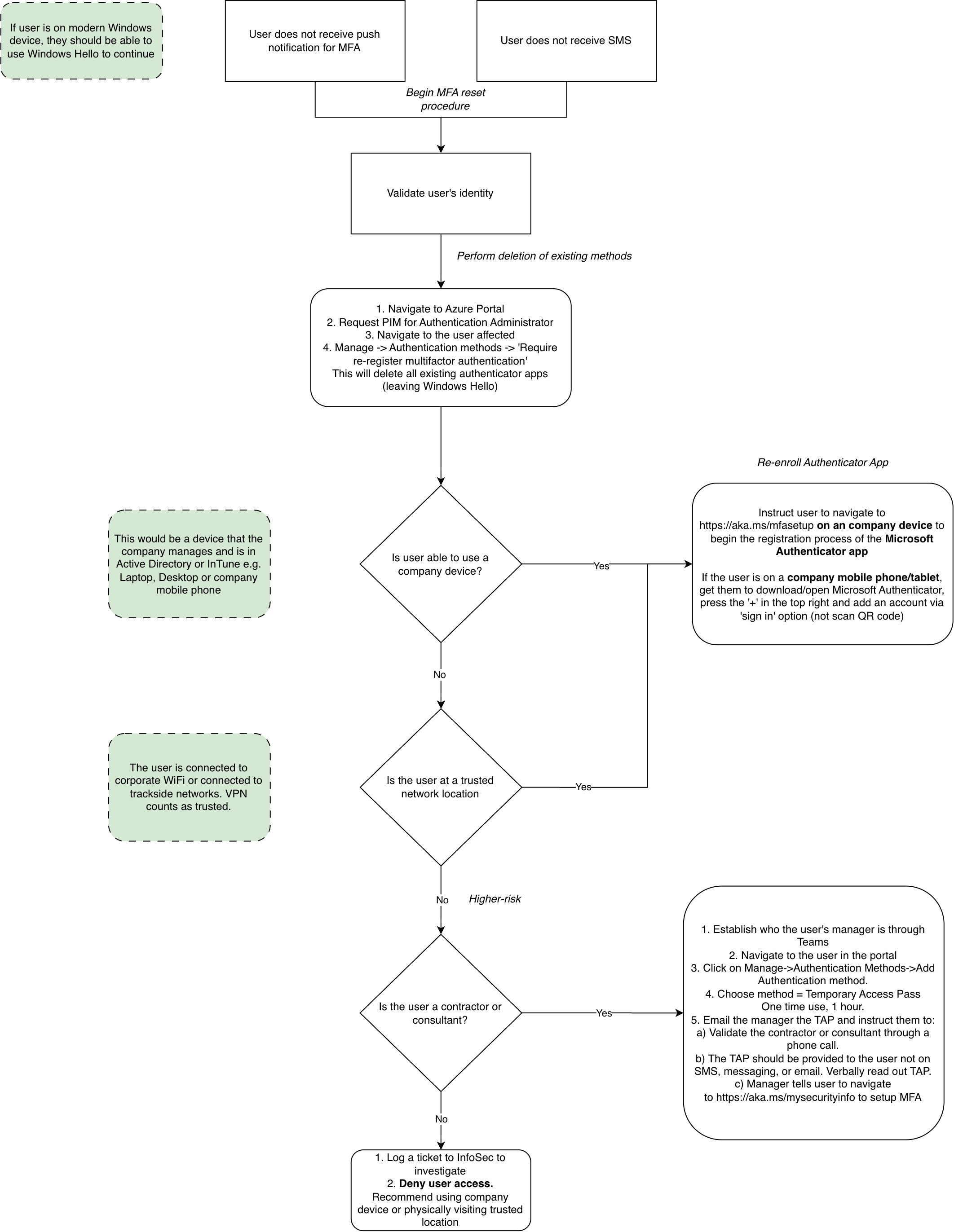
See an example help desk recovery process used by a customer. Adapt it to your organisation’s setup.
3) Joiners, Movers and Leavers (JML) processes are updated for passkeys
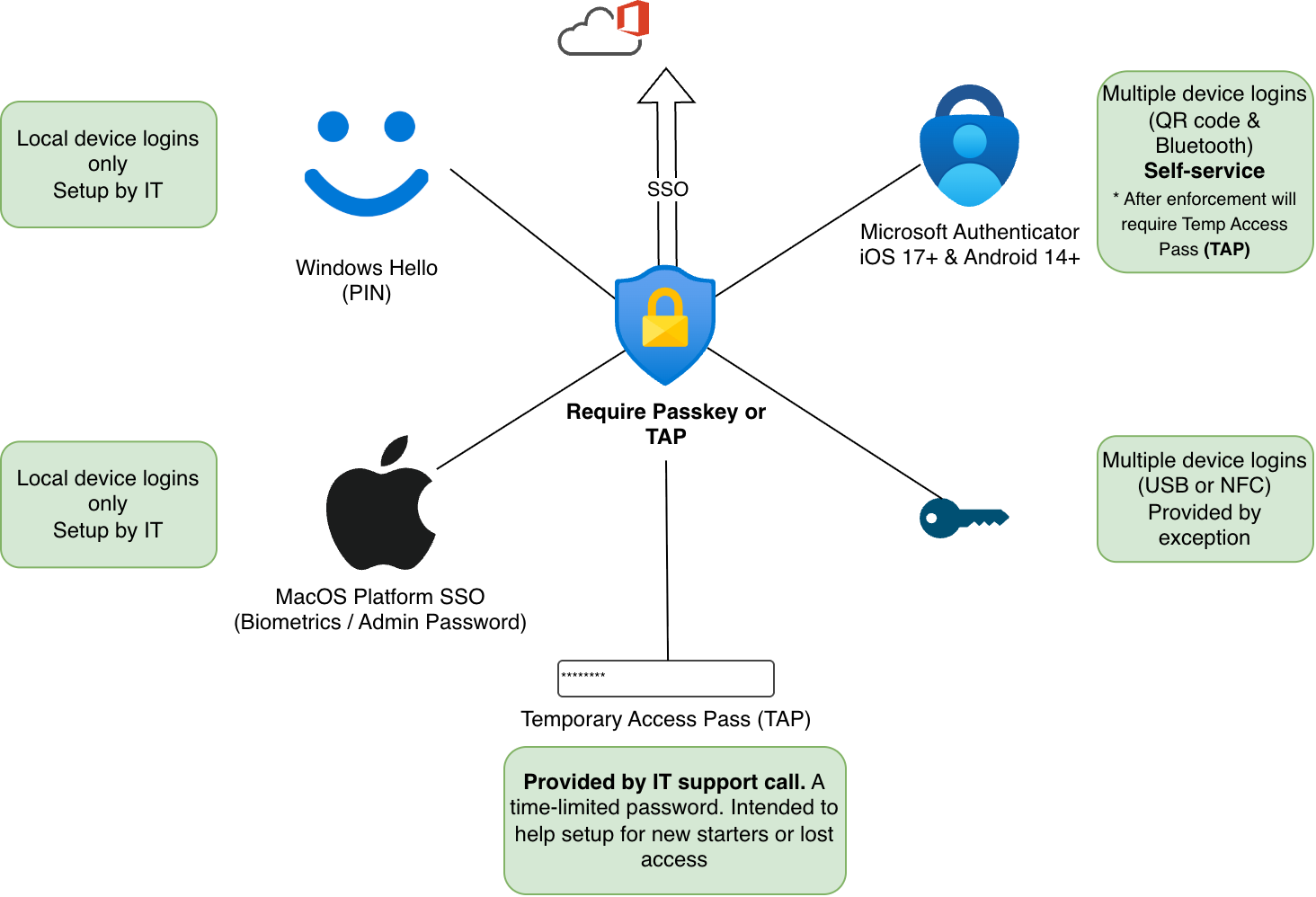
Most companies issue usernames and passwords to users, but the new conditional access policies may block the user from signing in as they do not have a passkey on day one. User onboarding often needs modifying to allow new starters to enrol in passkeys. This can be achieved through careful CA policy design and Temporary Access Passes (TAP)
Clear setup instructions help users complete registration. Our Passkey Helper provides user guidance that you can include in your onboarding process.
Completion criteria
- New employees have a secure way to register and use passkeys before receiving wider access to company systems.
- The standard setup process does not depend on weaker fallback authentication.
- Device preparation, account creation, and access permissions are coordinated with passkey setup.
- Hiring managers, IT staff, and the help desk understand how a new employee signs in on their first day.
Questions to answer
- How does a new employee securely register their first passkey?
- What can they access before completing setup?
- Does the process work for remote employees, contractors, and people without a company-managed mobile device?
4) Monitoring confirms passkey use and detects gaps
A migration project can complete, but gaps can slowly introduce over time. For example, someone might add the wrong network to a trusted location, and that becomes excluded from the passkey policy (which may be based on a true story!). Would your monitoring detect the sudden increase in single-factor sign-ins?
Regular checks help you find changes that reduce protection after the migration is complete.
Completion criteria
- Sign-in logs show that the expected users and applications meet your passkey or other approved phishing-resistant authentication requirements.
- There is a process responsible for reviewing the logs for requiring passkeys.
- Alerts are configured and tested to detect significant reductions in policy coverage or increases in exceptions.
- Conditional Access insights are used to check sign-ins where the relevant policies did not apply. Each gap has an understood reason.
Questions to answer
- Which applications, devices, or locations still rely on weaker authentication?
- Would your alerts detect a policy change that lets more users sign in without a passkey?
- Are TAP creations and CA/Group membership changes detected and alerted against?
- Who investigates an alert, and what action should they take?
5) Service accounts have appropriate protection
Anyone managing Entra ID dislikes service accounts, but also they’re hard to eliminate.
Service accounts need a different approach because they cannot use passkeys. Record how each one is protected and who is responsible for it.
Completion criteria
- Service accounts, shared accounts, automation identities, and emergency access accounts (often called “break-glass” accounts) have been identified.
- Each type of account has a clear (and documented) path through conditional access.
- If your project has time to rectify service accounts, consider: replacing service accounts with named individuals, moving in-house apps across to managed identities and turning generic mailboxes into shared mailboxes with disabled accounts.
Questions to answer
- Which accounts cannot use passkeys, and what still depends on them?
- How are the remaining accounts protected against phishing and access from unmanaged devices?
- Where direct user sign-in is unnecessary, is it blocked?
Our condensed checklist:
Use these checks when deciding whether to close the migration project:
- Passkeys are required for everyday sign-ins, with agreed exceptions.
- Sign-in logs confirm that the intended authentication methods are being used.
- Tested alerts detect significant reductions in policy coverage or increases in exceptions.
- Service accounts have appropriate protections and do not provide an uncontrolled way around the sign-in requirements.
- The help desk can restore access securely.
- New employees set up passkeys through the standard onboarding process.
- Remaining exceptions are documented, protected, accepted by the organisation, and reviewed regularly.
If this checklist has highlighted gaps in your rollout, try the free tier of our Passkey Helper to see how user guidance and rollout tracking could help your organisation. For support with conditional access policy design, staging/planning your migration, recovery processes, or managing exceptions, explore A2g Cyber consultancy services.